Thursday, May 30, 2013

Top 5 ways to write better posts

Everyone would want their posts to be better. But the question everyone are facing is "HOW TO MAKE MY POSTS BETTER??". They want their posts to be better because they want to keep their current readers and attract more. They want their blog popular. They want more traffic. But you should remember that making a good post takes time. You should not just write this, write that. Follow the steps bellow and learn how to make better posts.

1. Include pictures
A post without a picture is like a helicopter without a propeller. It won't be complete. Moreover, your posts would look dull. People like colourful things rather than a bunch of "dull-things". And what's more? You readers will be attracted to your posts. Add pictures when you are starting a post and also add it somewhere in the middle of that same post. However, do not include too many pictures in a row starting from top to bottom. It wouldn't look good. If you are posting many pictures in a single post, making a picture slideshow is recommended.


2. Your font
Everyone knows we should not judge the book by the cover but your post will be not looking good without a good font. Choose a font that is easy to read and also looks nice ex: Calbiri (body). It will attract people like a magnet attracting things. Your readers will definitely like to read when your font is good-looking.

3. Your font colour
It is not only the font that counts. Your font colour should be good too. Choose a font colour which matches your template. The colour used by the majority is pure black (hex: #000000). Don't choose light and fancy colours such as yellow which are difficult to read. You can see what i am talking about in the below picture comparing two colours. But of course, if you have a dark background in your posts, you should choose light colours. The most ideal colour is white (hex: #ffffff)


4. Your post should be worth reading
Your posts should be worth reading. The thing we are talking about here is your content. Write what readers want to read and you should have a nice style of writing. Don't write like "there was a queen" but write like "once upon a time, there was a queen" then, your readers will enjoy reading your posts.

5. The length of your posts-not too long and not too short
The length of your posts should not be too long neither should be too short. It should be a medium sized one.  When your posts are too short, readers judge them as "not good enough" and when your posts are too long, they judge them as "too long. time consuming. we can't read all that stuff" or readers even may get bored of reading it.

Wednesday, May 29, 2013

How to insert a slideshow to your blog

Slideshows are better than just putting a bunch of many pictures next to next. Blogger does not allow you to make a slideshow with your own photos in it in posts. So, you have to make a slideshow using HTML codes. By using the method described here, you can insert slideshows not only in your blog posts but also in your template. Follow the steps below on "how to insert a slideshow to your blog". You can see a demo of slideshow below.


Step 1: Go to Slideful and create a slideshow
Go to www.slideful.com and make a slideshow. When you come to the part saying you how you want your slideshow select option 2 which is:

Option: HTML code

Use your slideshow by inserting a html code to your page. It will use browsers Flash Player(TM). 

►►►► Get the html code here ◄◄◄◄ 


Step 2: Copy the code you get
Copy the code you got when you had chosen the above option.

Step 3: Go to new post
Go to blogger> New Post and paste the code you get. Make sure you make the font colour you copied black and the backround of the copied HTML white or else, you can just see your HTML literally.

Step 4: Make sure you select Interpret typed HTML
You pasted a code which is in HTML form so to show the slideshow, click Options in the right side if your post writing page and tick "Interpret typed HTML".

Step 5: You are done!!
Now, you are done. Click publish and if you have done all the steps correctly, you should see a picture slideshow.


How to delete your blog


Sometimes, some people may make more than one blog. When they find it difficult to update their blog or due to some other similar reason, they may want to get rid of those blogs. It's not actually called "getting rid of" but is called "deleting" blogs. To delete a blog in blogger, follow the steps below.

Step 1: Go to Blogger Dashboard>Settings
Go to blogger settings and if you have more than one blog, go to the settings of the blog that you want to delete.


Step 2: Go to "other"
Now that you are in the settings, find the button "other" in the left corner.


Step 3: Click Delete Blog
Now you will find a part titled as "Blog tools". Under that part, you can see the three options: Import blog, Export blog, Delete Blog. Now press delete blog so that a new window will pop out. There, click "Delete this blog" if you want to delete it. If you want to save a copy of your blog in your computer before deleting it, press "Download Blog".

Tuesday, May 28, 2013

How to upload a template that you downloaded (blogger)


Sometimes, people get bored of blogger templates so they download templates from other sites. You will receive the template in XML format. To upload this template to blogger follow the simple steps given below.

Step 1: Go to Blogger Dashboard>Template
Of-course, because you are uploading a template, you have to go to Blogger Dashboard and go to template.

Step 2: Click Backup/Restore
Click Backup/Restore located on the right side so a new window will pop out.


Step 3: In the new window, click "choose file"
Now that you have a new window, click choose file and select your template (which will be in XML format). When you select the file, you will come back to the new window. Now press upload and you are done!!

Monday, May 27, 2013

How to add a scrolling go to top button for blogger

There are go to top buttons which allows your readers to go to top. But some of them does not sound very cool as because it brings your readers directly to the top without an effect. Try out this go to top button which will go to top by scrolling or is more like scroll to top. To do this, follow the steps bellow. If you want to get a preview of this effect, you can go to www.mvcamera.blogspot.com and see it there.

  1. To do this, go to http://www.scrolltotop.com/ and choose a go to top button which you like and which matches for your template. 
  2. Now go to Blogger Dashboard>Template>Edit HTML.
  3. Now, paste the code you copied just after this tag <body>. If you have difficulty in finding tags, you can press Ctrl+F and search for the tag.
  4. You are done!! Now, click Preview Template and you should see a button when you scroll down. If you like it, click save template but if you don't, it's up to you. 

Sunday, May 26, 2013

How to make a "go to top" and "go to bottom" button in your blog


Adding a "go to top" or "go to bottom" button in a blog makes it user friendly and also helps the readers to scroll up and down immediately. This button given here goes to top or goes to bottom with a "scroll". To do this, you need to add some HTML codes to your blogger template. Follow these simple steps to add a "go to top" and "go to bottom" to your blog.

Step 1: Go to your blog dashboard>Template>Edit HTML and paste the following code.

As mentioned above, because you need to add some codes to your HTML, you must go to Edit HTML. Now, paste this code just after the tag <b:skin>. (Finding codes in a template could be sometimes a little difficult but don't worry. You can search for a code by pressing Ctrl+F)

 /* Up and Down Buttons with jQuery
----------------------------------------------- */
.button_up{
padding:7px; /* Distance between the border and the icon */
background-color:white;
border:1px solid #CCC; /* Border Color */
position:fixed;
background: white url(https://blogger.googleusercontent.com/img/b/R29vZ2xl/AVvXsEgMTFnnhBwVgQbZBKaPGHIPhUNWoclKZ97DjSEPWZucvjwAHJUgm_CXdyWbkpFSYqEgNfrbPAjNWERX5F8sCVRiZl2pT3CL1YRg5FRfssKyMcC8i08pLIvbbonxUbYPlW64dnm1sLAKZKY/s16/arrow_up.png) no-repeat top left;
background-position:50% 50%;
width:20px; /* Button's width */
height:20px; /* Button's height */
bottom:280px; /* Distance from the bottom */
right:5px; /* Change right to left if you want the buttons on the left */
white-space:nowrap;
cursor: pointer;
border-radius: 3px 3px 3px 3px;
opacity:0.7; 
filter:progid:DXImageTransform.Microsoft.Alpha(opacity=70);
}
.button_down{
padding:7px; /* Distance between the border and the icon */
background-color:white;
border:1px solid #CCC; /* Border Color */
position:fixed;
background: white url(https://blogger.googleusercontent.com/img/b/R29vZ2xl/AVvXsEi6MrjydC1nf6PmvCbCdozRTia95lERIKVKCWziJRRsYUq51VMHts1QtnuqvljV_U39j902CyI7Oi9q4RfCTzT-q2d75r6kVC9LjVFGW72qROFcL3ubhWPui7kCzWsySiLzb4UYP7mP8Nk/s16/arrow_down.png) no-repeat top left;
background-position:50% 50%;
width:20px; /* Button's width */
height:20px; /* Button's height */
bottom:242px; /* Distance from the bottom */
right:5px; /* Change right to left if you want the buttons on the left */
white-space:nowrap;
cursor: pointer;
border-radius: 3px 3px 3px 3px;
opacity:0.7;
filter:progid:DXImageTransform.Microsoft.Alpha(opacity=70);
}     

Step 2: Find the tag <body> and paste the following code just after it.

<script src='http://ajax.googleapis.com/ajax/libs/jquery/1.7.1/jquery.min.js' type='text/javascript'/>

<div class='button_up' id='button_up' style='display:none;'/>
<div class='button_down' id='button_down' style='display:none;'/>

<script>
//<![CDATA[
(function(){var special=jQuery.event.special,uid1='D'+(+new Date()),uid2='D'+(+new Date()+1);special.scrollstart={setup:function(){var timer,handler=function(evt){var _self=this,_args=arguments;if(timer){clearTimeout(timer)}else{evt.type='scrollstart';jQuery.event.handle.apply(_self,_args)}timer=setTimeout(function(){timer=null},special.scrollstop.latency)};jQuery(this).bind('scroll',handler).data(uid1,handler)},teardown:function(){jQuery(this).unbind('scroll',jQuery(this).data(uid1))}};special.scrollstop={latency:300,setup:function(){var timer,handler=function(evt){var _self=this,_args=arguments;if(timer){clearTimeout(timer)}timer=setTimeout(function(){timer=null;evt.type='scrollstop';jQuery.event.handle.apply(_self,_args)},special.scrollstop.latency)};jQuery(this).bind('scroll',handler).data(uid2,handler)},teardown:function(){jQuery(this).unbind('scroll',jQuery(this).data(uid2))}}})();

$(function() {
var $elem = $('body');
$('#button_up').fadeIn('slow');
$('#button_down').fadeIn('slow'); 
$(window).bind('scrollstart', function(){
$('#button_up,#button_down').stop().animate({'opacity':'0.2'});
});
$(window).bind('scrollstop', function(){
$('#button_up,#button_down').stop().animate({'opacity':'1'});
});
$('#button_down').click(
function (e) {
$('html, body').animate({scrollTop: $elem.height()}, 800);
} );
$('#button_up').click(
function (e) {
$('html, body').animate({scrollTop: '0px'}, 800);
} );});
//]]>

</script>
 
Step 3: Go to preview template.
When you go to preview template, you should see a button on the right side of your blog. If not, you may have done something wrong. Just check if you have followed all the steps or just left out one. Hope you enjoy this button!!


Friday, May 24, 2013

How to change your blog's scrollbar


Everybody likes things which are different. So how about changing your scroll bar into a different one? We need to add some codes to your blog's HTML (template) so that means the first step for you is to go to Blogger>Template>Edit HTML. HTML is a little complicated for some blogger users but you will get familiar with it as you bring many changes to it or get practice. Now lets see how we change the scroll bar.
But before you start this, you should remember that the scroll bar change only works on webkit browsers. It will not work in browsers such as Firefox, Opera etc.

Step 1: Go to Blogger>Template>Edit HTML

Step 2: Press Ctrl+F and search for 
. When you find this code, paste the below code just before it.

/* Webkit Scrollbar */
::-webkit-scrollbar {
width: 15px;
}
::-webkit-scrollbar-track {
background: #ffffff;
-webkit-box-shadow: inset 1px 1px 2px #E0E0E0;   
border: 1px solid #D8D8D8;
}
::-webkit-scrollbar-thumb {
background: #646464;
-webkit-box-shadow: inset 1px 1px 2px rgba(155, 155, 155, 0.4);  
}
::-webkit-scrollbar-thumb:hover {
background: #AAA;
}
::-webkit-scrollbar-thumb:active {
background: 000066;
-webkit-box-shadow: inset 1px 1px 2px rgba(0,0,0,0.3);
}

Step 3: Now go for preview template and if you see the change, you are done. If not, you may have done something wrong.


Wednesday, May 22, 2013

Colourful


Photo: Ahmed Aman Ibrahim/ AMAZING/ amazinglysuper.blogspot.com
Camera: Sony Xperia Z
Quality: 13.1 Megapixel
Edited using: Photoshop CS6
Effect: Colour Splash


Sunday, May 19, 2013

How dhonbandaarain liberated Maldives


Dhonbandaarain is a famous national hero of Maldives. He liberated Maldives from the Malabars who ruled in Maldives for 3 months and 20 days.
The story begins when a group of Malabars sent by the Ali Rajas of Kannannur burnt down the sultan's palace and kidnapped him. A group of courageous maldivians decided to liberate Maldives. Their leader was Hassan Manikfaanu. When he liberated Maldives, he was renamed as Dhonbandaarain. Later, Dhonbandaarain defeated some other Malabars at Dhonakulhi and was again renamed as Hassan Rannabanderi Manikfaanu. The people of Maldives offered him to be their sultan's but Dhonbandaarain refused by saying that there was a sultan of Maldives still living (that is the kidnapped sultan-Sultan Mukarram Mohammed Imaadhuddin). When Sultan Mukarram Mohammed Imaadhuddin died, Dhonbandaarain became the Sultan and was called Sultan Ghazee Hassan Izzuddin.

Saturday, May 18, 2013

Blogger now on smart phones


Blogger is not only in computers now. It is also available in phones! Now,you can be blogging anywhere which cannot be done with personal computers. You cannot carry computers anywhere but for your phone, you can.
The Blogger app for your phone is available in Google play. It is a simple and a good application where you can not only be blogging but also allows you to upload photos from your camera.
Although you can use this app anywhere, it does not allow you to see your blog overview or stats. This is a major problem because bloggers cannot see their number of pageviews within the app. However, they can go to Blogger.com from the internet and see their blog with all the features on a computer.

Monday, May 13, 2013

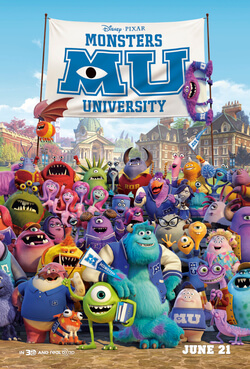
Monsters University


Monsters university is a newer version of Monsters Inc. It is an upcoming 3d cartoon made by Pixar Animation Studios and distributed by Walt Disney Pictures .Dan Scallon is the director and Koe Rae is the producer. This cartoon will be released on June 20, 2013.
In this cartoon, you will see 17 year old Mike (green colour, one eyed in the above image) who is studying scaring. He meets another person also learning scaring and they both become enemies. However, in the end, they become friends.


Sunday, May 12, 2013

Planes


Disney has made a cartoon called Cars which was followed by Cars 2. Now, they are working  to make a   new cartoon called Planes. It will be released on 9th August 2013. In this cartoon, you will see a single prop plane called Dusty (above) challenging his high-flying heroes in an international race. Although he is not built for competitive racing, he never lost hope in reaching his dreams.

 Characters you will see


Trailer


Saturday, May 11, 2013

Sorrow and Horror


On a very dark night 
In a place cold and damp
Named as nowhere
I had a lonely camp

I was weeping and weeping
I was cold and scared
No friends and no family
No people who cared

Was life this lonely?
I was filled with fear
Drowning in tear
My death was here

Ahmed Aman Ibrahim

Friday, May 10, 2013

Despicable Me 2


Despicable me 2 is an upcoming newer version of Despicable me produced by Illumination Entertainment and distributed by Universal Pictures. It will be released on July 3, 2013. In Despicable me 2, new characters will appear such as people from the anti-villains league. Gru is recruited by this league to help them fight against a villain called Eduardo. Despicable me 2 will be directed by Pierre Coffin and Chris Renaud and written by  Cinco Paul and Ken Daurio. 


Croods


The Croods is a comedy and adventurous 3d cartoon produced by Dream Works Animation and distributed by 20th Century Fox. It was released on February 15, 2013. The Croods were written and directed by Kirk DeMicco and produced by Kristine Belson and Jane Hartwell. 
It shows the story of a family going on an adventure to save their lives. Before, they used a cave as a hiding place and they feel that hiding is wrong. They meet a guy called Guy who joins the family and become a part of the adventure. 

People in the cartoon
  1. Grug: The father and leader of the family
  2. Eep: Grug's eldest daughter
  3. Guy: A boy who uses his brain to come up with ideas
  4. Belt: Guy's pet which he uses as his belt
  5. Ugga: Grug's wife
  6. Gran: Ugga's mother
  7. Thunk: Grug's and Ugga's son
  8. Sandy: Grug's and Ugga's youngest and smallest child

Trailer 1


Trailer 2


Trailer 3


Thursday, May 9, 2013

Tigers

Photo: A Siberian tiger grooming
Photo: Joel Sartore/ link
The largest of the big cats are tigers. They have a huge head and they grow 8 feet (2.5 cm). They also have a  tail of 3 feet (90 cm). Tigers not only have striped fur but their skin is striped too. The stripes are like fingerprints. No two tigers have the same. The use of these stripes are to blend against their background in forests. Most tigers avoid humans although some are dangerous maneaters.
Tigers eat mainly at night. They prey on animals such as deers and buffaloes. Many people think that for a tiger, to catch a prey is very easy. However, that is wrong. Tigers make a lot of effort to make a kill. Nine out of ten of their attacks fail.
Tigers live most of their lives alone. The female ones and the males ones meet only to mate. They leave urine samples and scratches on trees to keep other tigers out of their territory.
Two to six tigers are born at a time which are raised with on help from the male. They live with their mother for three years. Cubs cannot hunt until they are 18 months old. They live with their mother for two to three years and disperse to find their own territory.
Tigers are an endangered species. Three subspecies of tigers has already become extinct in the 20th century. 
Hunters killing them for their skin and farmers destroying their habitats for land has reduced a huge number of them. They are now restricted to special reserves in Asia mainly is India and Sumatra.   


Photo: Bengal tiger with cub
Photo: Michael Nichols/ http://animals.nationalgeographic.com/animals/mammals/bengal-tiger/

Big cats

Photo: An African cheetah leaping through the air
Photo: Chris Johns/ link
Big cats are large animals. They have the same basic body structure as pet cats. However, they are very different. Instead of purr or meow, they roar or grunt. Instead of keeping at houses, they are kept at zoo. During day time, big cats will be usually sleeping and resting and at night they will be active and watchful. Big cats are deadly hunters. The result of their attacks would surely be terrible wounds on their victims. Some examples of big cats include lions, tigers, cheetah and leopards.
In zoos, big cats are disturbed by their visitors. Visitors calling them to attract attention make them stressed and  as a result, the cats behave abnormally. They may pace aimlessly back and forth or they may spend unusual amount of time cleaning themselves. They may also be more vigilant.
To prevent this, we could improve the cats enclosure, by keeping the visitors a little away from them or could display notices on how to behave near these animals.   

Amazing Facts
  1. Cheetahs run at a speed of up to 113 km per hour
  2. An adult lions' roar can be heard 8 km away
  3. A leopard can carry a prey twice its own weight up a tree
  4. Cheetahs do not roar (although other big cats do) they purr
  5.  Lions are the only cats that live in groups (called prides)

Lions are  majestic big cats found mainly on the grasslands of Africa. They live in groups called prides. They are the only social cats living together. Only male lions have manes. Female lions mainly hunt although male ones are the first to eat.


Tuesday, May 7, 2013

How to stop following a blog


Some times people need to stop following blogs. For some reason or the other they have to. Maybe they have to stop because there are too many blogs on their reading list so they could not read it all or maybe the person who writes the blog stops writing so the blog will not update again. Read the instructions in this tutorial to know how to stop following a blog.

Step 1: Go to blogger homepage.
Go to blogger homepage from this link: http://www.blogger.com/home. If you have not signed in, please sign in to continue. 

Step 2: Find the option: manage reading list.


Click the "manage reading list" which is boxed in red. Click on it so a new window will appear. There you can find your reading list. 


On the right side, you will find settings. Click on it. Again, a new window will appear. Now, you can click on "stop following this site" and now you have stop following your unwanted site!! Hope this helped you.


Monday, May 6, 2013

How to make your blog popular

1. Customize your blog template or get a good one.
Many people judge things by the looks of it. Making your template a good one is a way to attract readers. If your blog looks interesting and creative, readers will like to read it. To get a good template, you can search Google or you can even use a blogger template. Keep the template with good fonts, gadgets and anything else that makes your blog good looking.

2. Content.
Your blog must be worth reading.Write about what many readers like to read. You can't make your blog popular only by the looks of it. The content should be good too. Write nice essays or information or anything else and don't forget to include pictures. Pictures make posts interesting.

3. Submit your blog to search engines.
Submit your blog to search engines. Go to settings>privacy>edit and choose the option: visible to search engines. When your blog is visible to search engines, people  searching for something will find your blog if it has a content related what is searched. Submit your blog to Google as it is the most popular search engine. Go to this link http://www.google.com/submityourcontent/website-owner/ to submit your blog. There are other good search engines too, like Bing and Yahoo!.

4. Post regularly.
If you write a post today and wait for a week, readers who are interested in your blog will stop reading it. Readers do not like blogs which do not update regularly. You should post at least one post a day so your reader will like it.

5. Give an option for readers to follow your blog.
Give an option for readers asking them to follow their blog so that they could follow your blog with a single click. If a person follows your blog, it means that they have added your blog to their reading list.

6. Don't give up.
Some people start writing blogs and after a few days, stop because they didn't get the number of audience they want. But to give up is stupid. You can't make your blog popular in one day. It takes a lot of time. When you start blogging, you may get 2 page views or even no page views a day.


Thursday, May 2, 2013

Colour Splash


Colour Splash photographs has a part of it black and white and a part of it in colour. It is done by editing it. The photo will look good if the part in colour is colourful.

How to make a colour splash photograph

  1. Open it with Adobe Photoshop. (I am using Adobe Photoshop CS3)
  2. Press Alt+Shift+Ctrl+B (now, your photo will be black and white).
  3. Select the history brush tool.


    4. Start colouring (Ctrl+ + will zoom the photo. It may be useful)

Earth ppt